Right Ear
| Freq | 500Hz | 1kHz | 2kHz | 4kHz |
|---|---|---|---|---|
| Initial AC | ||||
| Masked AC | ||||
| Norm Shift | ||||
| Est. SAL BC | - | - | - | - |
Left Ear
| Freq | 500Hz | 1kHz | 2kHz | 4kHz |
|---|---|---|---|---|
| Initial AC | ||||
| Masked AC | ||||
| Norm Shift | ||||
| Est. SAL BC | - | - | - | - |
| Freq | 500Hz | 1kHz | 2kHz | 4kHz |
|---|---|---|---|---|
| Initial AC | ||||
| Masked AC | ||||
| Norm Shift | ||||
| Est. SAL BC | - | - | - | - |
| Freq | 500Hz | 1kHz | 2kHz | 4kHz |
|---|---|---|---|---|
| Initial AC | ||||
| Masked AC | ||||
| Norm Shift | ||||
| Est. SAL BC | - | - | - | - |
| 500Hz | 1kHz | 2kHz | 4kHz | Action | |
|---|---|---|---|---|---|
| New Norms | |||||
| Custom Norms | - | - | - | - | |
| App Defaults | 55 | 60 | 60 | 60 |
SAL is useful when traditional masking approaches are likely to overmask and lead to masking dilemma. Bilateral conductive hearing losses with large unmasked air-bone gaps are the most common use case for SAL.
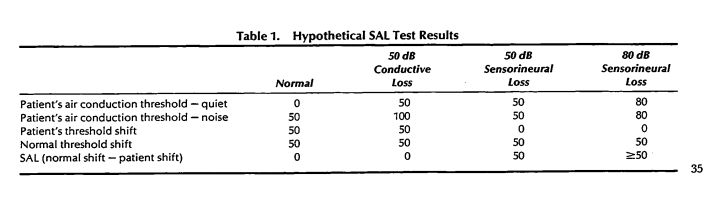
Measure unmasked AC thresholds 500Hz-4kHz in each ear and enter results in the 'Initial AC' fields. Place the bone oscillator on center of the forehead and present narrow-band masking noise through it at the max level of channel 2 (or use the levels listed below the grids) then remeasure AC thresholds and enter them in the 'Masked AC' fields. The estimated BC thresholds will be calculated and displayed in the 'Est. SAL BC' row.
SAL uses normative data based on each audiometer and averaged responses from normal subjects. Each audiometer likely has different maximum outputs for bone-conduction (BC) narrow-band noise (NBN) at each freqeuncy. The SAL procedure asks you to set channel 2 to the maximum level per frequency/NBN using the BC oscillator placed on the patient's forehead. The max output will vary by frequency (usually between 40-60dB). You can use the default norms but it is likely better to establish specific norms for your booth. The BC masking noise will cause the AC thresholds to increase if the ear has conductive loss. If the loss is sensory the masking qon't cause much shift. The amount of increase (unmasked AC vs masked AC) will guide you on the estimated level of the true BC hearing threshold.
Test air-conduction on a few normal subjects at 500Hz, 1kHz, 2kHz, and 4kHz in each ear (unilateral is also fine). Retest the same subjects at the same frequencies via AC but place the BC oscillator on the forehead and set channel 2 routed to BC with NBN signal at the highest output allowed by the machine. Subtract the unmasked threshold from the masked threshold to get the shift value for each frequency. Average the shift values across your subjects to get the norm value for that frequency.
Click the Custom Norms button and enter your data and click save. The norms data will only be saved locally to the computer you are currently on. This SAL app does not send or sync any data remotely.
This can happen when the loss is mixed and the best unmasked BC thresolds are near the moderate range of hearing loss. Try another AC transducer to see if there is higher output. If that doesn't help then you may need to stick with "masking dilemma".